

Getting Help
The docs didn't solve it. Your assistant is confused. Something is genuinely broken. Here's where to go next.
Ask your assistant first
This sounds obvious, but it's worth saying: your assistant can troubleshoot itself.
“Why isn't my calendar working?”
“Something went wrong with that last action. What happened?”
“Help me debug this skill.”
Your assistant has access to its own logs, its own configuration, and its own error messages. It can often diagnose and fix problems faster than any support channel.
Share feedback
Share feedbacksends your recent logs to the Vellum team along with a short note from you. It's the single most useful thing you can do when something goes wrong — without logs, we're guessing.
On the desktop app, open the Help menu in the macOS menu bar and pick Share Feedback.
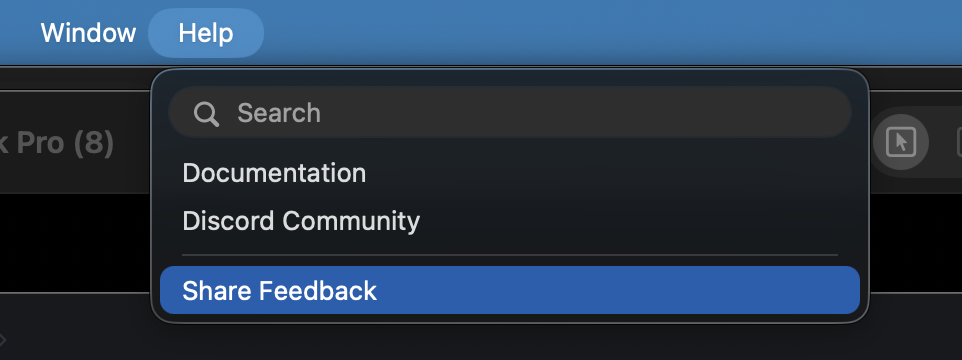
You can also reach the same form from the sidebar drawer menu, the conversation right-click menu, or the Share Feedback button that appears in Settings after an upgrade error.
On the web app, open the user menu in the top-right corner and pick Share Feedback.

A short modal will appear — describe what happened in a sentence or two, then submit. The form bundles your last few minutes of logs so the team can see exactly what went wrong on your end.
Community
Check out our Community page for links to Discord, forums, and other channels.
When community channels are available, they'll be the fastest way to get help from other users who've probably hit the same issue. We'll also have team members active in the community.
Email support
For issues that don't fit in a public channel, or if you need direct help. We'll do our best to respond quickly.
What to include when asking for help
No matter where you ask, these details help us (or the community) help you faster:
| Detail | Why it helps |
|---|---|
| What you were doing | Context for the problem |
| What went wrong | The error, the unexpected behavior, the missing result |
| Error messages | The exact text, not a paraphrase |
| macOS version | Compatibility issues are real |
| Vellum version | Bugs get fixed in updates |
| Skills involved | Narrows down the problem area |
| Steps to reproduce | Lets us recreate the issue on our end |
Check for updates
Sometimes the fix already exists in a newer version:
“Check for updates.”
“Update Vellum.”
Your assistant can check for and install updates. Many issues are resolved by simply being on the latest version.
That's everything. If you've read this far, you're either very thorough or very stuck. Either way, we appreciate you. Now go talk to your assistant. It misses you. 😏


The Personal AI you were promised